What gets signed off
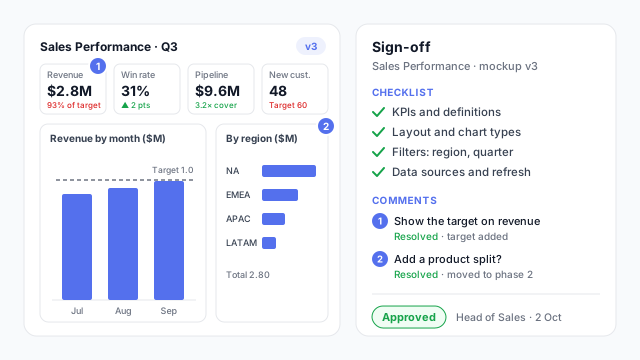
Sign-off works best on something people can see. The example shows a typical approval on a mockup:
- A specific version. “Sales Performance v3”, not “the dashboard”. If v4 appears later, it needs its own approval.
- A checklist. KPIs and their definitions, layout and chart types, filters, data sources and refresh. Each item is something that would be expensive to change after the build.
- Resolved comments. Both review comments on v3 have been answered, one with a change, one with an explanation.
- A named approver and a date. The Head of Sales, on 2 October. One accountable person, even if several people gave feedback.
Who should sign off
The approver is the person who owns the decisions the dashboard supports. Other people review and comment, but one person approves. On consulting projects, that’s usually the client sponsor named in the statement of work. Internally, it’s the business lead who requested the dashboard.
Get a second, separate sign-off from the data owner when the dashboard relies on a source the business team doesn’t control. They’re approving that the numbers can actually be produced as defined.
Signing off at the right stage
| Stage | What the sign-off settles |
|---|
| Requirements | Audience, questions, KPIs and targets |
| Wireframe | Layout and what’s on each page |
| Mockup | Chart types, labels, look and the final spec |
| Built report (UAT) | That the real numbers match the definitions |
Many teams combine the first three into a single mockup sign-off. The last one, user acceptance testing, happens on the real report with real data.
Best practices
- Approve a picture, not a paragraph. People read requirements quickly and react to mockups carefully. A high-fidelity mockup gets more honest feedback.
- Collect comments where the design is. Comments pinned to the visual they’re about are easier to resolve than an email thread.
- Write down what’s out of scope. It’s the part of the sign-off that saves the most time later.
- Make approval explicit. “Looks fine” in a meeting isn’t sign-off. A reply, a status change or a signed document is.
- Keep the approved version. Export it (PDF or PPTX) and keep it with the project, so the build can be checked against it.
Mocking up for sign-off
Sign-off is quicker when stakeholders review a realistic mockup they can comment on. Mockko lets you share a project with editor, commenter or viewer access, so reviewers can pin comments directly on the visuals. Our guide to presenting a dashboard mockup to stakeholders covers how to run the review meeting and get a clear yes.