How it works
A bookmark is a snapshot of a page. Set it up the way you want it, open View > Bookmarks, and click Add. Later, selecting the bookmark puts the page back exactly as it was.
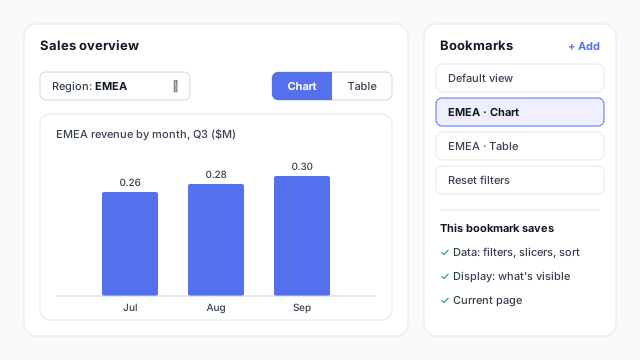
In the example, the page has a Region slicer set to EMEA and the chart showing (the table is hidden). The EMEA · Chart bookmark saves three things:
- Data: the Region = EMEA slicer, any filters and the sort order.
- Display: which visuals are visible. Visibility comes from the Selection pane, where you can hide or show each visual.
- Current page: so a bookmark can also take readers to another page.
On its own, a bookmark is just a saved view. It gets useful when you attach it to a button.
Common uses
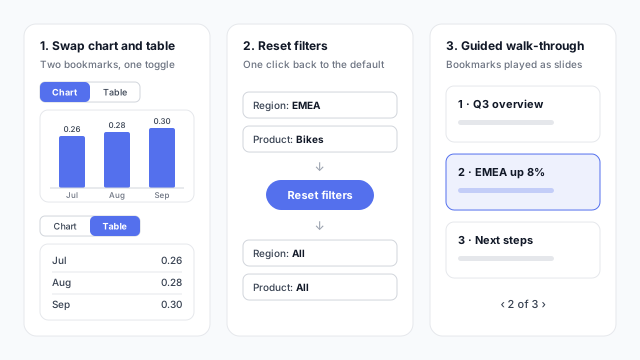
- Swapping visuals. Two bookmarks, one with the chart visible and one with the table, sit behind a Chart / Table toggle. Readers get two views in the space of one, without a second page.
- Resetting filters. A bookmark of the page with no filters, behind a Reset filters button, gives readers a way back after they’ve clicked around. Turn on only Data for this one so it doesn’t change what’s visible.
- Guided walk-throughs. A sequence of bookmarks, each with its own filters and visible visuals, can be played as slides from the Bookmarks pane. It’s a simple way to present a report in a meeting without leaving Power BI.
Bookmarks can also show and hide a panel of slicers, which keeps filters out of the way until a reader asks for them.
Bookmarks vs. other ways to move around
| Need | Use |
|---|
| Same page, different saved state | Bookmark |
| Another page, filtered to one item | Drillthrough |
| Quick detail without leaving the page | Tooltip page |
| Plain page-to-page navigation | Page navigator button |
Best practices
- Name bookmarks for what they show. “EMEA · Table” beats “Bookmark 7” once a report has twenty of them.
- Untick what a bookmark shouldn’t change. A toggle that also resets the reader’s slicers is a common annoyance. Turn off Data for show/hide bookmarks.
- Use Selected visuals for toggles. Applying a bookmark to only the visuals it controls stops it from overriding the rest of the page.
- Re-check after edits. Bookmarks remember visuals as they were. After moving or adding visuals, click through every bookmark and update any that broke.
Mocking up bookmarks
Toggles, reset buttons and hidden filter panels are design decisions, and they’re far cheaper to agree on as two or three mockup states than to rebuild in Power BI. See why to mock up Power BI reports before you build.